Generic CRMs track contacts. A real estate CRM tracks leads, listings, showings, and commission splits. That difference either costs you deals or wins them.
It sounds like a small distinction until a late-night portal lead sits unanswered while you’re at a listing appointment, or a past client lists with someone else because your follow-up plan lived on a sticky note.
So, what is a real estate CRM exactly, and when do you actually need one? Here’s the plain-English version: how these systems work, the 7 features worth paying for in 2026, and how to choose one without sitting through a dozen demos.
What Is a Real Estate CRM?
A real estate CRM (customer relationship management system) is software that keeps every lead, client, listing, and deal in one place, then automates the follow-up around them. Instead of generic sales stages, it’s organized the way agents actually work: inquiries, showings, offers, closings, and commissions.
In practice, that looks like this. A buyer asks about a listing at 9:40 p.m. The CRM captures the lead, assigns it to the right agent, sends an instant reply, and schedules the morning call. No copy-pasting, no “I’ll add them to the sheet later.”
The simplest way to think about it: a spreadsheet stores what already happened. A CRM makes the next thing happen.
What does CRM stand for in real estate?
CRM stands for customer relationship management. In most industries, that relationship is a sales cycle measured in weeks. In real estate, it’s measured in years: buyers become sellers, sellers become referrers, and the agent who stayed in touch gets the call. A real estate CRM is built for that long game.
Who actually needs one?
- Solo agents use it as a second brain. It remembers lease expiration, birthdays, and the buyer who wanted three bedrooms under a specific budget, so nothing depends on your memory during a busy week.
- Teams use it for lead routing and accountability. Every lead gets an owner, every task gets a deadline, and nobody quietly falls through the cracks between agents.
- Brokerages use it for visibility. Pipeline health, agent performance, and commission reporting across every desk, without chasing fifteen spreadsheets at month end.
Real Estate CRM vs. Generic CRM: What’s the Difference?
You can run a real estate business on a generic CRM the way you can cut drywall with a bread knife. It’s technically possible. It’s also slow, messy, and you’ll resent it daily.
Generic platforms are built for selling software, services, or products, so their pipelines end in an invoice rather than a closing table. Real estate CRMs bake the industry into the product:
| Generic CRM | Real estate CRM | |
| What you track | Companies, deals, support tickets | People and properties, linked together |
| Pipeline stages | Lead, proposal, invoice | Inquiry, showing, offer, under contract, closed |
| Client data | Company size, renewal date | Budget, preferred areas, beds and baths, financing, timeline |
| Listings | Not a concept; you would have to build it | Native, often with MLS/IDX sync |
| Follow-up tempo | Weekly or quarterly touches | Minutes for new leads, years for past clients |
| Money | Deal value | Commission splits, referral fees, team overrides |
Could you rebuild all of this in a generic tool with custom fields and plugins? Sure. But most agents who try stop updating it within a month, and a CRM nobody updates is just an expensive contact list.
The 7 Real Estate CRM Features That Matter in 2026
Feature lists run long these days, and most of it is noise. If a platform nails these seven, it will carry a real business.
1. Lead capture and speed-to-lead automation
Every inquiry, whether it comes from a portal, your website, social media, or WhatsApp, should land in one inbox, get an instant response, and route to the right agent automatically.
Speed is the whole ballgame. Harvard Business Review research found that companies contacting a lead within an hour were nearly 7 times more likely to qualify it than those that waited even an hour longer. Online property leads are less patient than that; they’re usually messaging three agents at once.
2. A pipeline shaped like a transaction
Your stages should read like your business: new inquiry, qualified, showing, offer, under contract, closed. A visual pipeline shows which deals are stuck and what next month looks like, before your bank account breaks the news.
3. Listings with MLS/IDX sync
Listings shouldn’t live in a different system from the buyers who want them. Native listing management, ideally synced with your MLS or portals, means price changes and status updates flow through automatically, and matching a new buyer to inventory takes seconds instead of a hunt across three tabs.
4. Follow-up automation that still sounds like you
Most leads aren’t ready to transact for 6 to 18 months. Drip campaigns, task reminders, and message templates keep you present that entire time without you personally remembering anyone.
One caution: automation should sound like a person, not a robot wearing your headshot. Good CRMs let you write sequences in your own voice and jump in manually at any point.
5. Showings, tasks, and a calendar that talks back
Booking showings, collecting feedback afterward, and chasing paperwork between contract and close is where deals quietly die. A real estate CRM turns all of it into assigned tasks with reminders, on your phone, because that’s where this job actually happens.
6. Commission tracking and splits
This is the feature generic CRMs simply don’t have. Splits, referral fees, and team overrides decide what you actually take home. A CRM that calculates them per deal replaces the end-of-month spreadsheet ritual, along with the arguments that come with it.
7. Reporting that answers one question: what’s working?
In NAR’s 2025 Technology Survey, agents ranked social media (39%), their CRM (23%), and the MLS (17%) as the technologies producing their best-quality leads. Useful context, but those are averages. The only numbers that matter are yours.
Good reporting connects every closing back to its original source, so next year’s marketing budget is built on evidence instead of vibes.
And one requirement that isn’t really a feature: all of it has to work one-handed on a phone in a parking lot. If a CRM only shines on a desktop, it won’t survive a busy Saturday.
Where Lista CRM Fits
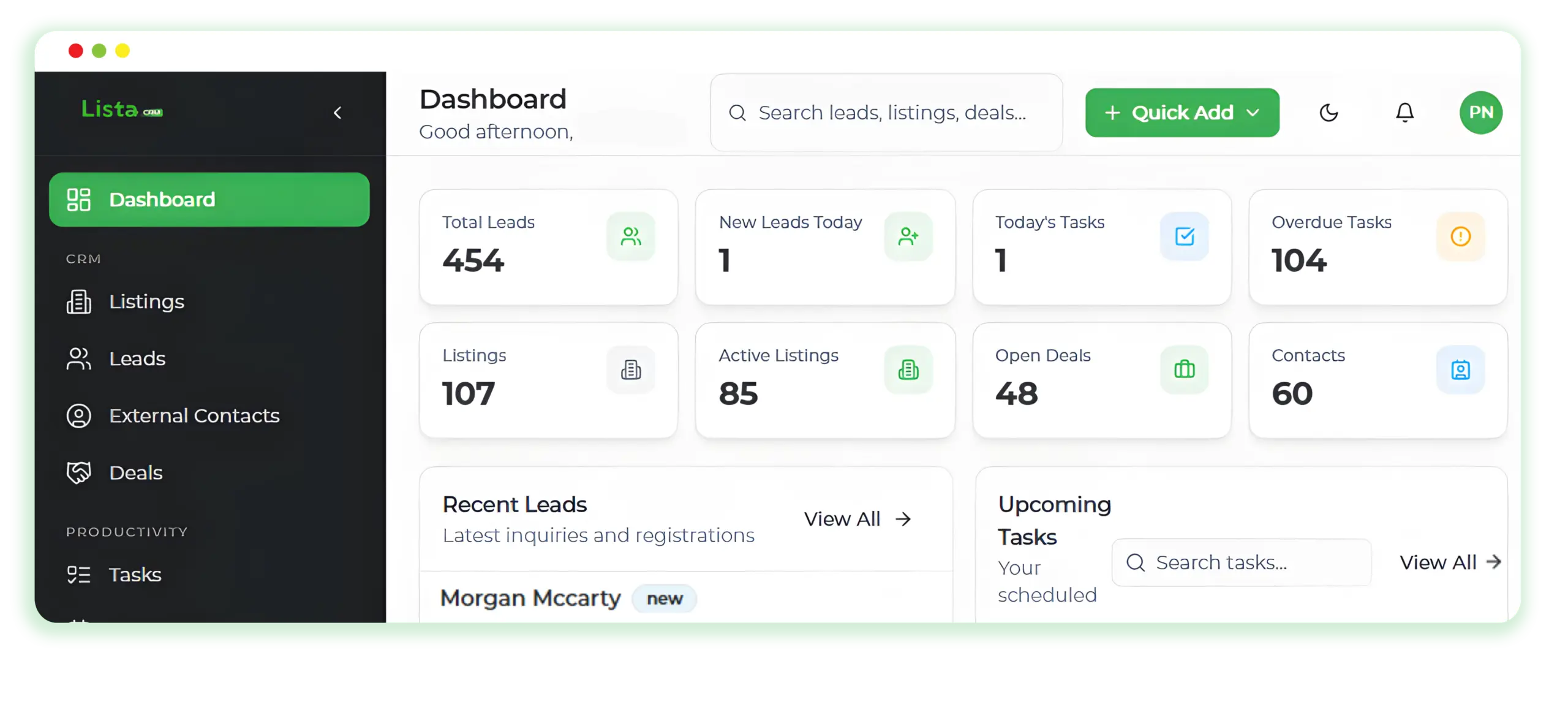
Lista CRM was built around the exact workflow in this guide: lead scoring and routing, MLS-synced listings, a visual deal pipeline, showing and task reminders, commission-ready reporting, and IDX-ready agent microsites that capture leads straight into the system. One platform for solo agents, teams, and brokerages, instead of five tools taped together.
The fair way to judge it is the same way you’d judge anything on your shortlist: put your own pipeline in it and see how it feels. Book your free demo and we’ll walk through your process, not a canned one.
FAQ: Quick Answers About Real Estate CRMs
What is a real estate CRM in simple terms?
It’s one system that stores your leads, clients, listings, and deals, and automates the follow-up between them. Think of it as a database, an assistant, and a pipeline report rolled into one tool built specifically for agents.
How is a real estate CRM different from Salesforce or HubSpot?
Generic platforms can be configured for real estate, but you’re the one configuring: property fields, listing records, MLS connections, and commission math all have to be built or bought. A real estate CRM ships with those on day one, which is usually cheaper and always faster.
Do solo agents really need a CRM?
Solo agents often get the most out of one, because there’s no team to catch what you drop. The CRM remembers every follow-up, birthday, and buyer preference so you can spend your hours selling instead of administering. It also makes hiring your first assistant far less painful.